

Over 58% of marketers now use AI tools in their content workflow — yet most of them still struggle to rank past page two. The problem isn’t the AI. It’s how people use it.
If you’ve tried pasting a topic into ChatGPT, hitting publish, and wondering why nothing happens — you’re not alone. This guide shows you exactly how to use AI to write SEO content that actually ranks, from picking the right tools to editing your draft so Google notices it. By the end, you’ll have a clear, repeatable process you can start using today.
What AI Can (and Can’t) Do for Your SEO Content
AI is genuinely useful for writing SEO content — but it’s not magic. Think of it as a very fast first-draft machine, not a finished-article machine.
Here’s what AI does well: it generates structured drafts quickly, suggests related subtopics, helps you write meta descriptions, and speeds up research summaries. According to research published by McKinsey & Company, generative AI can cut content creation time by up to 40% for knowledge workers.
What AI doesn’t do well: it makes things up (called “hallucinations”), it doesn’t know your audience personally, and it has no real-world experience to draw from. You still need to fact-check everything it produces.
Does Google Penalise AI Content? Here’s the Truth
This is the question everyone’s afraid to ask. The short answer: no, Google doesn’t automatically penalise AI content — but it does penalise bad content.
Google’s own guidance (from their Google Search Central documentation on helpful content) states that they reward content that is “helpful, reliable, and people-first” — regardless of how it was produced. Their issue is with low-quality, spammy content, not AI specifically.
So if you publish a thin, generic AI article with no real insight, it won’t rank. But if you use AI as a starting point and then add genuine expertise, real examples, and proper optimisation — it absolutely can rank. That distinction matters a lot.
The Tools You Actually Need (Free and Paid)

You don’t need to spend hundreds of dollars a month to get started. Plenty of free tools handle the heavy lifting when you’re just finding your feet. If you want a full breakdown of what’s worth your time in 2026, check out our best AI tools for bloggers — free and paid picks — it covers everything from writing assistants to SEO helpers, so you can choose the right stack before you write a single word.
| Tool | Best For | Free Option? |
|---|---|---|
| ChatGPT | Writing drafts and prompts | Yes (GPT-3.5) |
| Google Keyword Planner | Keyword research | Yes |
| Surfer SEO | On-page optimisation scoring | No (paid) |
| NeuronWriter | Affordable Surfer alternative | Limited free trial |
| Hemingway Editor | Readability check | Yes |
| Google Search Console | Tracking rankings | Yes |
| Yoast SEO (WordPress) | On-page SEO checks | Yes |
You can run a solid workflow with just ChatGPT, Google Keyword Planner, Hemingway Editor, and Google Search Console — all free. Paid tools like Surfer SEO speed things up, but they’re optional when you’re starting out.
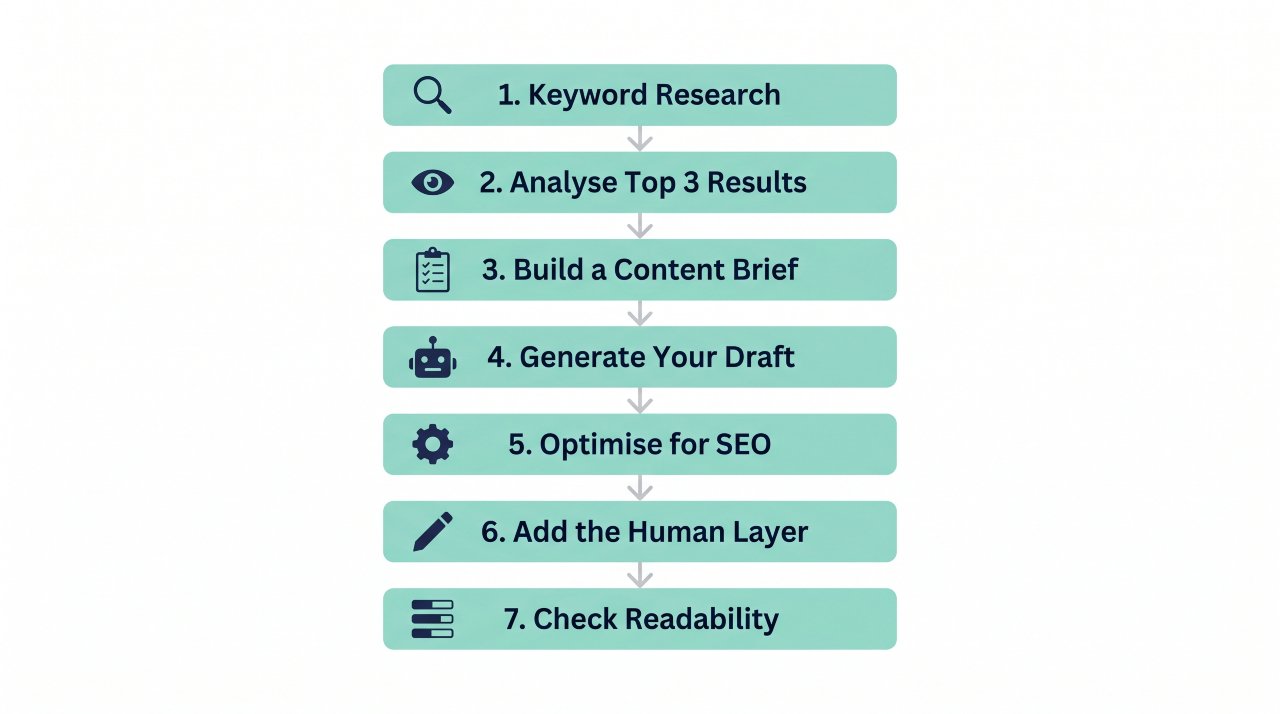
Step-by-Step: How to Use AI to Write SEO Content
This is the part most articles skip. Here’s the exact process, with real prompts you can copy right now.
Step 1: Do Your Keyword Research First
Never skip this step. AI can’t tell you what people are searching for — only data can.
Open Google Keyword Planner or a free tool like Ubersuggest and type your broad topic. Look for keywords with decent search volume (500–10,000/month) and low-to-medium competition. Pick one primary keyword and two or three related ones.
Example: If your topic is AI writing tools, your primary keyword might be “best AI writing tools for beginners” with secondary keywords like “free AI writing software” and “AI blog post generator.”
Step 2: Analyse the Top 3 Results
Before you write a single word, search your keyword on Google and read the top three results. Note what headings they use, how long the articles are, and what questions they don’t answer. This tells you exactly what to include — and where to do better.
You’re looking for gaps: topics they glossed over, questions they ignored, or explanations that assumed too much knowledge. Those gaps are your opportunity.
Step 3: Build a Content Brief for the AI
This is where most beginners go wrong. They type “write me an article about X” and get a generic blob of text. You need to give the AI a proper brief.
Here’s a prompt template you can copy:
“You are an SEO content writer. Write a 1,500-word blog post targeting the keyword ‘[your keyword]’. The audience is beginners aged 16–40. Use a friendly, conversational tone. Include these headings: [list your H2s]. Answer this question clearly in the intro: [your reader’s main question]. Do not use jargon without explaining it. Include a FAQ section at the end.”
The more specific your instructions, the better your output will be. Treat the AI like a new team member who needs clear direction, not a mind reader.
Step 4: Generate Your Draft
ChatGPT is the most popular starting point, but it’s not the only option. If you’re not keen on creating an OpenAI account or you’ve hit the free usage limit, there are solid alternatives that work just as well for drafting SEO content. Check out these free ChatGPT alternatives that actually work to find one that fits your workflow before you start building your process. Paste your brief into ChatGPT (or whichever tool you’re using) and generate the first draft. Don’t edit as you go — let it run the full draft first.
You’ll probably get something that’s 70–80% usable. Some sections will be generic. Some facts might be wrong. That’s completely normal and expected. Your job now is to fix it, not to start over.
Step 5: Optimise for On-Page SEO
Once you have a draft, it’s time to optimise it. Here’s your checklist:
- Make sure your primary keyword appears in the title, first 100 words, at least one H2, and the meta description
- Check that related keywords appear naturally throughout (don’t force them)
- Aim for a keyword density of 0.5–2% — use a free tool like WordCounter to check
- Add internal links to related articles on your site
- Write a compelling meta description under 160 characters
If you’re using WordPress, the free Yoast SEO plugin walks you through most of this automatically.
Step 6: Add the Human Layer

This step is what separates content that ranks from content that doesn’t. AI produces generic text. You need to add specific, real, human things.
Go through the draft and add: a personal or real-world example, a specific data point with a source, an opinion or recommendation, and anything that makes the article feel like a person wrote it. This is also where you fix any hallucinated facts — always verify statistics and claims before publishing.
A good rule of thumb: if a sentence could have been written about any topic by anyone, rewrite it. Make it specific.
Step 7: Check Readability Before Publishing
Run your finished article through the Hemingway Editor. Aim for a Grade 7–8 reading level — that’s the sweet spot for online content. Break up any long sentences, simplify complex words, and make sure every paragraph is easy to scan.
Google rewards content that users actually read and engage with. If people bounce off your page in 10 seconds because it’s hard to read, your rankings will suffer. Readability isn’t a nice-to-have — it’s an SEO factor.
How to Edit AI Content So It Actually Ranks
Editing AI content well is a skill, and it’s faster to learn than most people think. Here’s what to focus on.
Remove filler. AI loves phrases like “it is important to note that” and “in today’s fast-paced world.” Delete them every time you see them. They add zero value.
Fix the facts. AI tools like ChatGPT have a knowledge cutoff and they hallucinate. Any statistic, date, or named study needs to be verified before it goes live. One wrong fact can destroy your credibility.
Add your voice. Read your draft out loud. If it sounds like a robot wrote it, it probably did. Rewrite those sections in the way you’d actually explain something to a friend.
Check the structure. Every H2 section should have a clear point, an explanation, and either an example or a data point. If a section is just vague advice, cut it or make it specific.
Common Mistakes Beginners Make With AI SEO Content
Knowing what not to do saves you a lot of wasted time.
Publishing without editing. Raw AI output almost never ranks. It needs human editing, fact-checking, and personalisation before it’s ready.
Ignoring search intent. If someone searches “how to use AI for SEO,” they want a how-to guide — not a definition of AI. Match your format to what the searcher actually wants.
Using the same prompt every time. Every article needs a different brief. A post about keyword research needs different instructions than a post about link building.
Skipping keyword research. Writing great content about a topic nobody searches for gets you nowhere. Always start with data.
Not building topical authority. One article rarely ranks on its own. Publishing a cluster of related articles (e.g., AI writing tools, AI for keyword research, AI content editing) tells Google you’re a credible source on the topic.
The Honest Limitations of AI for SEO Content
AI tools are genuinely useful — but they have real limits you should know about upfront.
They can’t access real-time information (unless connected to the web via a plugin). They don’t know your brand voice without detailed instructions & they sometimes produce confident-sounding content that’s factually wrong. And they can’t replace genuine expertise on complex or sensitive topics.
For topics in health, finance, or law — Google’s E-E-A-T guidelines require demonstrated experience and expertise. AI alone won’t cut it in those niches. You’ll need credentialed authors or thorough expert review.
Use AI as your assistant, not your author. That mindset shift makes all the difference.
FAQ
Can AI-generated content rank on Google?
Yes, AI-generated content can rank on Google. Google’s own guidance says it evaluates content on quality and helpfulness, not on how it was created. AI content that’s well-edited, accurate, and genuinely useful to readers can rank just as well as human-written content.
What is the best AI tool for writing SEO content?
ChatGPT is the most popular starting point and has a free version. For SEO-specific features, tools like Surfer SEO or NeuronWriter add on-page scoring. If you’re on a tight budget, combine free ChatGPT with Google Keyword Planner and the Hemingway Editor.
Does Google penalise AI-written content?
Google doesn’t penalise content just for being AI-written. It penalises low-quality, spammy, or unhelpful content — regardless of how it was made. The key is to edit, fact-check, and add real value before publishing.
How do I make AI content SEO-friendly?
Start with keyword research, give the AI a detailed brief that includes your target keyword and headings, then optimise the draft for on-page SEO. Check keyword placement, add internal links, write a strong meta description, and run the article through a readability tool before publishing.
How long does it take to write SEO content with AI?
A 1,500-word article that used to take 3–4 hours can often be completed in 60–90 minutes using AI — if you include proper editing time. Don’t rush the editing phase. That’s where rankings are won or lost.
Is AI content good for SEO in 2024 and beyond?
AI content is a strong SEO tool when used correctly. Google’s helpful content updates reward expertise and usefulness — so AI that’s guided by human knowledge and properly edited performs well. The risk comes from publishing unedited, generic drafts at scale.
Wrapping Up
The single most important thing to take away from this guide: AI is a writing tool, not a ranking strategy on its own. It speeds up your process, but your editing, your expertise, and your keyword research are what actually get you to page one.
Here’s your next step: pick one article topic, find a keyword with Google Keyword Planner, write a detailed brief using the prompt template in Step 3, and generate your first AI-assisted draft today. Edit it, optimise it, and publish it. Then check Google Search Console in 4–6 weeks to see how it performs.
You’ve got everything you need to get started. Go write something that ranks.